How to Choose the Right Rack PDU for Modern Data Centers
In modern data centers, rack power distribution is no longer just about adding enough outlets. Based on our experience supporting data center cabinet, edge computing cabinet, and industrial IT enclosure projects, rack PDU selection problems often appear when buyers choose only by outlet count or price. Common issues include insufficient C19 outlets for high-power equipment, lack of monitoring for remote sites, and limited capacity for future GPU server expansion. Higher rack densities, AI servers, GPU clusters, edge computing deployments, and remote operation requirements have made the rack PDU a critical part of the electrical design.
A rack PDU affects uptime, maintenance efficiency, power visibility, cable management, and future expansion. A unit that looks acceptable during the first installation may become a bottleneck when the rack load increases from 4kW to 8kW, when A/B redundant power is added, or when operators need remote reboot and outlet-level monitoring.
This guide explains how to select a rack PDU from an engineering perspective, with practical examples for data centers, edge sites, colocation rooms, and industrial IT cabinets.
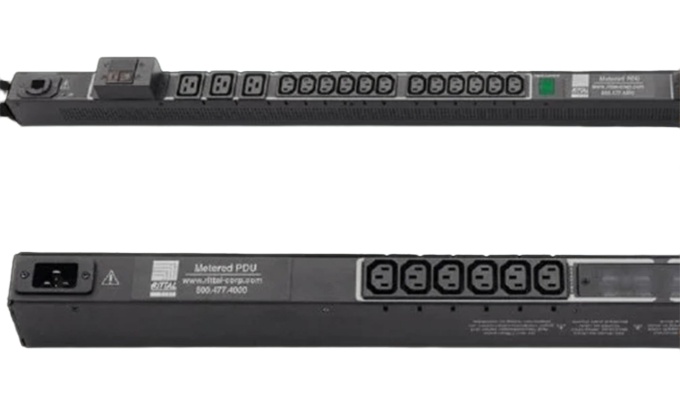
What Is a Rack PDU?
A rack PDU, or rack power distribution unit, distributes power from an upstream UPS, branch circuit, or power source to servers, switches, storage systems, and other rack-mounted equipment.
In modern infrastructure, rack PDUs may also provide:
- Real-time current, voltage, and power monitoring
- Outlet-level metering
- Remote outlet switching
- Environmental sensor integration
- Network communication through SNMP or other management protocols
- Alarm notifications for load, temperature, or power events
The right PDU is not only an accessory. It is the final power delivery layer between the facility electrical system and mission-critical IT equipment.
Why Rack PDU Selection Matters
Many buyers still compare PDUs mainly by outlet quantity, plug type, and purchase price. Those details matter, but they are only part of the decision.
The bigger questions are:
- Can the PDU support the rack's current and future load?
- Does it match the site's electrical architecture?
- Can operators monitor power usage before overloads occur?
- Can equipment be rebooted remotely when needed?
- Does the installation support clean cable routing and maintenance access?
- Can the PDU integrate with UPS, DCIM, or monitoring platforms?
Choosing a rack PDU without answering these questions often leads to higher lifecycle cost, limited scalability, and more operational risk.
Common Rack Power Distribution Problems
1. Load Imbalance Between Power Feeds
In many racks, equipment is added gradually over time. Even if the total rack load remains below the design limit, one branch or power feed may become heavily loaded while another remains underused.
This can lead to:
- Unexpected breaker trips
- Higher cable and connector temperature
- Reduced connector service life
- Shutdowns during peak demand
- Poor use of available power capacity
Metered or monitored rack PDUs help operators identify these trends before they become failures.
2. Insufficient Capacity for Future Expansion
A rack that starts at 4 kW may later need to support GPU servers, AI accelerators, high-density storage, or additional network equipment. If the original PDU was selected only for the initial equipment list, expansion may require temporary adapters, extra power strips, or cable modifications.
These workarounds increase complexity and introduce new failure points.
For long-term projects, the PDU should be sized according to the expected rack lifecycle, not only the first deployment.
3. Limited Power Visibility
Basic rack PDUs can distribute power reliably, but they provide little or no operating data. Without monitoring, operators may not see changes in:
- Current
- Voltage
- Power consumption
- Power factor
- Branch utilization
- Outlet-level usage
In high-availability environments, lack of visibility makes capacity planning and troubleshooting more difficult.
4. Manual Maintenance Requirements
When a device must be rebooted manually, technicians may need to enter the data hall or travel to a remote site. This increases response time and raises the chance of disturbing adjacent equipment.
Switched rack PDUs allow authorized users to turn outlets on or off remotely, helping reduce downtime and improve maintenance efficiency.
5.Common Mistakes We See in Rack PDU Projects
In real projects, common rack PDU selection mistakes include ignoring A/B feed balance, selecting a PDU without enough future capacity, using a basic PDU in remote locations, and choosing the wrong outlet mix for C13 and C19 equipment. These issues may not appear during initial installation, but they can create maintenance problems as rack density increases.
Main Types of Rack PDUs
Different rack PDU types are suitable for different operating environments.
| Rack PDU Type |
Main Function |
Typical Application |
| Basic PDU |
Power distribution only |
Small network cabinets or stable low-density racks |
| Metered PDU |
Local display of electrical load |
Sites requiring local load verification |
| Monitored PDU |
Remote power monitoring |
Data centers needing centralized visibility |
| Switched PDU |
Remote outlet control |
Edge sites, remote cabinets, and maintenance-sensitive racks |
| Intelligent PDU |
Advanced monitoring, outlet-level data, and integration |
Enterprise data centers, colocation, cloud, and AI infrastructure |
For small and stable cabinets, a basic or metered PDU may be sufficient. For high-availability infrastructure, monitored, switched, or intelligent PDUs usually provide better lifecycle value because they help operators detect issues earlier and reduce manual intervention.
How to Choose the Right Rack PDU
Step 1: Calculate Rack Power Demand
Start with the expected power load of the rack. Include both current equipment and planned expansion.
Key questions include:
- What is the present rack load?
- What is the projected load in 3 to 5 years?
- Will the rack support high-density servers or GPU equipment?
- Is A/B redundant power required?
- What is the maximum design load per feed?
Planning only for today's consumption may force early replacement when rack density increases.
Step 2: Match Voltage, Phase, and Current Rating
Electrical compatibility is more than matching a plug shape. The PDU must align with the site's power design.
Evaluate:
- Single-phase or three-phase power
- Input voltage
- Current rating
- Inlet connector type
- Branch circuit protection
- Maximum load capacity
- Local electrical requirements
For high-density racks, three-phase rack PDUs may help distribute higher power capacity more efficiently. For smaller cabinets, single-phase PDUs may be sufficient.
Step 3: Choose the Right Outlet Configuration
Outlet type and quantity should match the equipment that will be installed in the rack.
Common outlet types include:
- IEC C13
- IEC C19
- NEMA outlets
- Regional outlet standards
For mixed equipment, a combination of C13 and C19 outlets can provide more flexibility. Locking outlets may also be useful in high-density racks where cable security and airflow management are important.
Certification requirements should be checked by exact model number and project destination. Depending on the market, buyers may need UL, CE, RoHS, IEC connector compliance, or local electrical code documentation. For critical projects, certification documents should be confirmed before procurement.
Step 4: Decide the Required Monitoring Level
Monitoring requirements vary by site.
For simple network cabinets, a basic or metered PDU may be enough. For data centers, colocation sites, and remote infrastructure, monitored or intelligent PDUs provide much better operational control.
Consider whether you need:
- Local metering
- Remote monitoring
- Branch-level monitoring
- Outlet-level metering
- Threshold alarms
- Event logs
- SNMP or DCIM integration
The higher the uptime requirement, the more valuable power visibility becomes.
Step 5: Evaluate Remote Management Needs
If equipment is installed in remote sites, edge cabinets, or restricted data halls, remote outlet control can significantly reduce maintenance cost.
- A switched rack PDU allows operators to:
- Reboot locked devices remotely
- Power-cycle individual outlets
- Sequence startup after power restoration
- Reduce unnecessary onsite service visits
- Improve recovery time during incidents
For distributed infrastructure, this feature often delivers practical value beyond the initial hardware cost.
Step 6: Check Integration Requirements
A rack PDU should work as part of the broader infrastructure, not as an isolated device.
Common integration points include:
- UPS systems
- DCIM platforms
- Building management systems
- Network monitoring tools
- Environmental sensors
- Alarm management systems
Before procurement, confirm whether the PDU supports the required communication protocols, management interface, and access control model.
Step 7: Review Installation and Serviceabilit
Installation quality affects long-term reliability. A good PDU should make rack wiring cleaner, not more difficult.
Check:
- Zero-U mounting options
- Vertical or horizontal installation
- Cable routing clearance
- Outlet orientation
- Labeling space
- Locking power cords
- Maintenance access
- Operating temperature range
These details reduce installation time and simplify future maintenance.
Rack PDU Selection by Application
Enterprise Data Centers
Enterprise data centers usually require high availability, centralized monitoring, and predictable maintenance processes.
Recommended PDU features:
- Monitored or intelligent rack PDU
- A/B redundant power support
- Branch or outlet-level metering
- Network management
- Alarm notifications
- Integration with DCIM or monitoring systems
AI and High-Density Computing Racks
AI servers and GPU clusters can create much higher rack power density than traditional IT loads.
Recommended PDU features:
- Higher current capacity
- Three-phase input where required
- C19 outlet availability
- Accurate load monitoring
- Thermal and environmental sensor support
- Strong cable management options
Edge Computing Sites
Edge sites often have limited onsite technical support, so remote management is especially important.
Recommended PDU features:
- Switched outlets
- Remote reboot capability
- Environmental monitoring
- Compact installation design
- Event alerts
- Secure network access
Colocation Facilities
Colocation providers need visibility, tenant-level reporting, and flexible outlet configurations.
Recommended PDU features:
- Outlet-level metering
- Energy usage reporting
- User access control
- High connector flexibility
- Remote monitoring
- Clear asset and outlet labeling
Industrial IT Cabinets
Industrial environments may face higher temperature, dust, vibration, or electrical noise.
Recommended PDU features:
- Industrial-grade construction
- Wide operating temperature range
- High mechanical durability
- Reliable connectors
- Integration with enclosure cooling and sensors
- Clear maintenance access
Rack PDU Buying Checklist
Before choosing a rack PDU, confirm the following:
- Total rack power demand
- Future load growth
- Redundancy requirement
- Input voltage and phase
- Current rating
- Inlet connector type
- Outlet type and quantity
- Monitoring level
- Remote switching requirement
- Environmental sensor requirement
- Network protocol support
- Mounting method
- Cable routing plan
- Certification and compliance requirements
- Supplier technical support
This checklist helps prevent procurement decisions based only on price or outlet count.
Why Work With a Rack PDU Supplier That Provides Engineering Support?
Rack PDU selection is closely tied to the site's electrical design, rack layout, equipment roadmap, and operating model. For critical projects, choosing a supplier that can provide engineering guidance is often as important as choosing the product itself.
A qualified rack PDU supplier should help with:
- Product configuration
- Electrical matching
- Outlet layout selection
- Monitoring and communication options
- Installation planning
- Technical documentation
- Replacement and spare parts planning
- Long-term product support
If you are planning a data center, edge computing cabinet, industrial IT enclosure, or high-density server rack, our team can help you select a rack PDU configuration based on your actual load, connector, monitoring, and installation requirements.
Before recommending a rack PDU, Suwi can help review rack load, voltage, phase, current rating, outlet type, redundancy design, monitoring requirements, installation method, and certification documents. This helps buyers avoid choosing a PDU that fits the rack physically but does not match the electrical or operational requirements.
Need help choosing the right rack PDU? Contact our engineering team for a recommended configuration.
FAQ
Q 1: What is the difference between a basic PDU and an intelligent PDU?
A basic PDU distributes power without monitoring or remote management. An intelligent PDU can provide electrical data, network monitoring, alarms, outlet-level metering, and sometimes remote outlet control.
Q 2: When should I choose a switched rack PDU?
A switched rack PDU is useful when equipment may need to be rebooted remotely or when onsite maintenance is costly. It is commonly used in edge sites, remote server rooms, and high-availability environments.
Q 3: Is outlet-level metering necessary?
A: Outlet-level metering is valuable when operators need detailed power usage data for each device, tenant billing, capacity planning, or troubleshooting. It is especially useful in colocation and enterprise data centers.
Q 4: Should I choose single-phase or three-phase rack PDU?
A: Single-phase PDUs are common in smaller racks and moderate-density installations. Three-phase PDUs are often used in higher-density racks where more power must be distributed efficiently. The correct choice depends on the upstream power system and rack load.
Q 5: What certifications should a rack PDU have?
A: Common requirements may include UL, CE, RoHS, IEC-related connector compliance, and local electrical code compliance. Requirements vary by market and project, so documents should be checked by exact model number and configuration.
Q 6: How do I know how many outlets I need?
A: Count the equipment planned for the rack, then allow margin for future expansion. Also consider outlet type, power feed redundancy, cable routing, and whether high-power equipment requires C19 outlets.
Q 7: What information should I provide before requesting a rack PDU quotation?
A: To receive an accurate rack PDU recommendation, provide the rack load, input voltage, single-phase or three-phase requirement, current rating, plug type, outlet quantity, C13/C19 outlet mix, redundancy design, monitoring requirement, installation method, and target market certification requirements.
Conclusion
Choosing the right rack PDU requires more than comparing outlet count and price. The best choice depends on rack power density, redundancy design, monitoring needs, remote management requirements, installation conditions, and future expansion plans.
For modern data centers and critical IT infrastructure, the rack PDU should be treated as part of the overall power architecture. A properly selected PDU improves visibility, supports uptime, simplifies maintenance, and helps the infrastructure scale with future demand.
Looking for a rack PDU for your project? Share your rack power load, outlet requirements, and monitoring needs with our team, and we will help recommend a suitable configuration.