
Get a Free Quote
If you are interested in our products and want to know more details,please leave a message here,we will reply you as soon as we can.

Discover how the Rittal SK 3124300 IoT Interface enables intelligent enclosure monitoring in data centers. Learn how remote monitoring, OPC UA, Modbus TCP and Blue e+ cooling improve uptime and predictive maintenance.
1.Industry Background
AI compute has changed cabinet thermal design because the heat profile is no longer smooth, evenly distributed, or easy to predict from nameplate power. Traditional enterprise IT loads were often planned around moderate rack density and relatively stable utilization. GPU clusters behave differently. Training and inference workloads can ramp quickly, concentrate heat in specific rows, and create short thermal transients that do not always appear at the room cooling level. A CRAC or CRAH system may report acceptable return-air temperature while one UPS control cabinet, network distribution enclosure, or cooling control panel is already operating near its component limit.
This shift matters because data centers are not only made of server racks. Behind every AI hall are UPS cabinets, battery monitoring panels, switchgear control compartments, network cabinets, pump skids, chiller panels, containment controls, fire systems, and automation cabinets. These enclosures often contain PLCs, Ethernet switches, relays, power supplies, drives, I/O modules, and communication gateways. Many are less visible than IT racks, but their failure can stop the site just as effectively.
UPS cabinets are becoming more vulnerable to localized hotspots for three reasons. Load levels are higher, electrical rooms are more compact, and redundancy architectures place more power electronics into tighter footprints. Even when the UPS power stage is properly cooled, auxiliary control compartments may suffer from stagnant air, blocked filters, aging fans, or recirculated warm air from adjacent equipment. The result is a quiet reliability problem: the component that fails is not always the transformer, rectifier, or inverter. It may be a 24 VDC power supply, Ethernet switch, control relay, or display board inside an enclosure that never appeared on the thermal dashboard.
Traditional air-conditioning monitoring is no longer enough because room-level sensors average away the problem. A room sensor tells the facility team whether the space is broadly controlled. It does not tell the maintenance engineer whether the top third of an enclosure has reached 45°C, whether humidity is approaching a condensation risk after a door opening, or whether a filter fan has lost airflow due to dust. The industry is moving from room cooling supervision toward data center enclosure monitoring because reliability now depends on the conditions inside the cabinet, not only around it.
Edge data centers make this more urgent. Edge sites are smaller, distributed, and often maintained by regional technicians rather than a resident engineering team. They may sit in telecom shelters, manufacturing plants, logistics hubs, utility substations, or remote modular buildings. These environments introduce dust, wide ambient temperature swings, limited spare parts, and slower human response. A cabinet cooling monitoring system that looks optional in a staffed hyperscale facility can become essential in a remote edge deployment.
The engineering implication is clear: thermal management is becoming a distributed control problem. The data center can no longer be treated as one conditioned room with many passive cabinets. It is a collection of thermal micro-environments, each with its own heat sources, airflow paths, control loops, communication paths, and maintenance risk.
2. Why Traditional Cabinet Monitoring Is No Longer Enough
Traditional cabinet monitoring usually fails because it is designed around events, not degradation. A dry contact alarm from a cooling unit tells the operator that something has already crossed a defined failure threshold. It rarely explains the trend leading to that condition. By the time the alarm reaches the BMS, DCIM, or maintenance phone, the cabinet may already have spent hours operating above the recommended temperature for sensitive electronics.
The second weakness is poor sensor location. Many panels use a thermostat near the door or a single temperature switch near the cooling unit return. That may protect the cooling unit, but it does not represent the hottest electronics. Heat rises, cable ducts block airflow, and high-density DIN rail devices create narrow thermal plumes. In a real enclosure, a 7°C to 12°C difference between the lower intake area and the upper control zone is not unusual. A single thermostat can report “normal” while the top-mounted Ethernet switch is slowly cooking.
Alarm delay is also a system issue. A device detects a fault, a relay changes state, the signal enters a PLC or I/O module, the PLC scan updates, the SCADA server polls, the BMS imports the point, and the operator screen refreshes. Each step may be acceptable on paper. Together, they can add enough delay that the first meaningful notification appears after the cabinet has already moved from abnormal to critical.
Maintenance teams often discover failures after the incident because the available data is too thin. A red alarm lamp says little about whether the root cause was dust, high ambient temperature, compressor short cycling, door leakage, fan failure, sensor drift, low cooling capacity, or a communication fault. Without historical temperature, humidity, cooling-unit status, and alarm timestamps, the technician is forced into reactive troubleshooting.
Cabinet air conditioners are frequently ignored because they sit between disciplines. Facility teams own the room cooling. Electrical teams own the panels. IT teams own the network. Controls teams own the SCADA. Procurement buys the cooling unit. No single group naturally owns enclosure climate as a data source. That ownership gap is why an industrial enclosure monitoring solution should be designed as part of the architecture, not added only after repeated alarms.
3. Engineering Analysis
Cooling reliability starts with heat balance. Every enclosure has internal losses from power supplies, drives, PLCs, network switches, contactors, UPS control electronics, and cable resistance. If the cooling device removes less heat than the cabinet generates under peak ambient conditions, the enclosure temperature rises until a component trips or ages prematurely. The design mistake I often see is sizing cooling from average room temperature and nominal electrical load. A better approach is to calculate worst-case heat dissipation, check solar or adjacent equipment influence where relevant, and leave margin for filter contamination and aging.
Humidity deserves equal attention. High humidity can reduce insulation resistance, accelerate corrosion, and create leakage paths on printed circuit boards. Low humidity can increase electrostatic discharge risk. The most dangerous situation is not simply “high humidity”; it is a temperature crossing the dew point. A cabinet door opened during maintenance can introduce warm humid air. If a cooling unit then drives internal surfaces below dew point, condensation may form on terminals, metalwork, or electronics.
Dust affects thermal reliability in a way that is easy to underestimate. It reduces filter airflow, coats heat sinks, changes fan operating points, and can create conductive paths in polluted industrial sites. In data centers, dust problems appear around construction phases, battery rooms, loading areas, and edge sites near production floors. A filter fan may still spin, but airflow can be too low to remove heat. That is why temperature trend, fan status, maintenance hours, and differential behavior matter more than a simple “fan on” signal.
Fan lifetime is not fixed. It depends on bearing temperature, dust, vibration, duty cycle, and voltage quality. A fan operating continuously at high temperature may reach end-of-life much earlier than the same fan in a clean, moderate environment. Predictive maintenance is practical here because fan degradation often appears as rising cabinet temperature for the same load, longer cooling recovery time, or repeated high-temperature warnings before a hard trip.
Compressor cycling is another signal. Excessive short cycling can indicate poor setpoint strategy, incorrect cooling capacity, blocked airflow, door leakage, or unstable heat load. Long compressor runs may indicate insufficient capacity or high ambient temperature. Variable-speed systems such as Blue e+ can provide more useful operating behavior than simple on/off cooling, but the monitoring architecture must still capture status and trends.
Sensor placement should follow failure physics. Place temperature sensing near the most temperature-sensitive devices, typically upper DIN rail electronics, network switches, UPS control boards, or the hot-air return path to the cooling unit. Avoid placing sensors directly in the cold discharge stream, against metal surfaces exposed to external temperature, or near door gaps. Humidity sensors should represent cabinet air, not the cooling outlet. For larger enclosures, one sensor is rarely enough.
Communication delay should be treated as part of alarm design. OPC UA, Modbus TCP, and SNMP each serve different ecosystems. OPC UA is strong for structured industrial data and secure integration. Modbus TCP is simple and widely supported in PLC and SCADA systems. SNMP fits IT monitoring and DCIM workflows. The best protocol is not the newest one; it is the one that reaches the responsible team with enough context and acceptable latency.
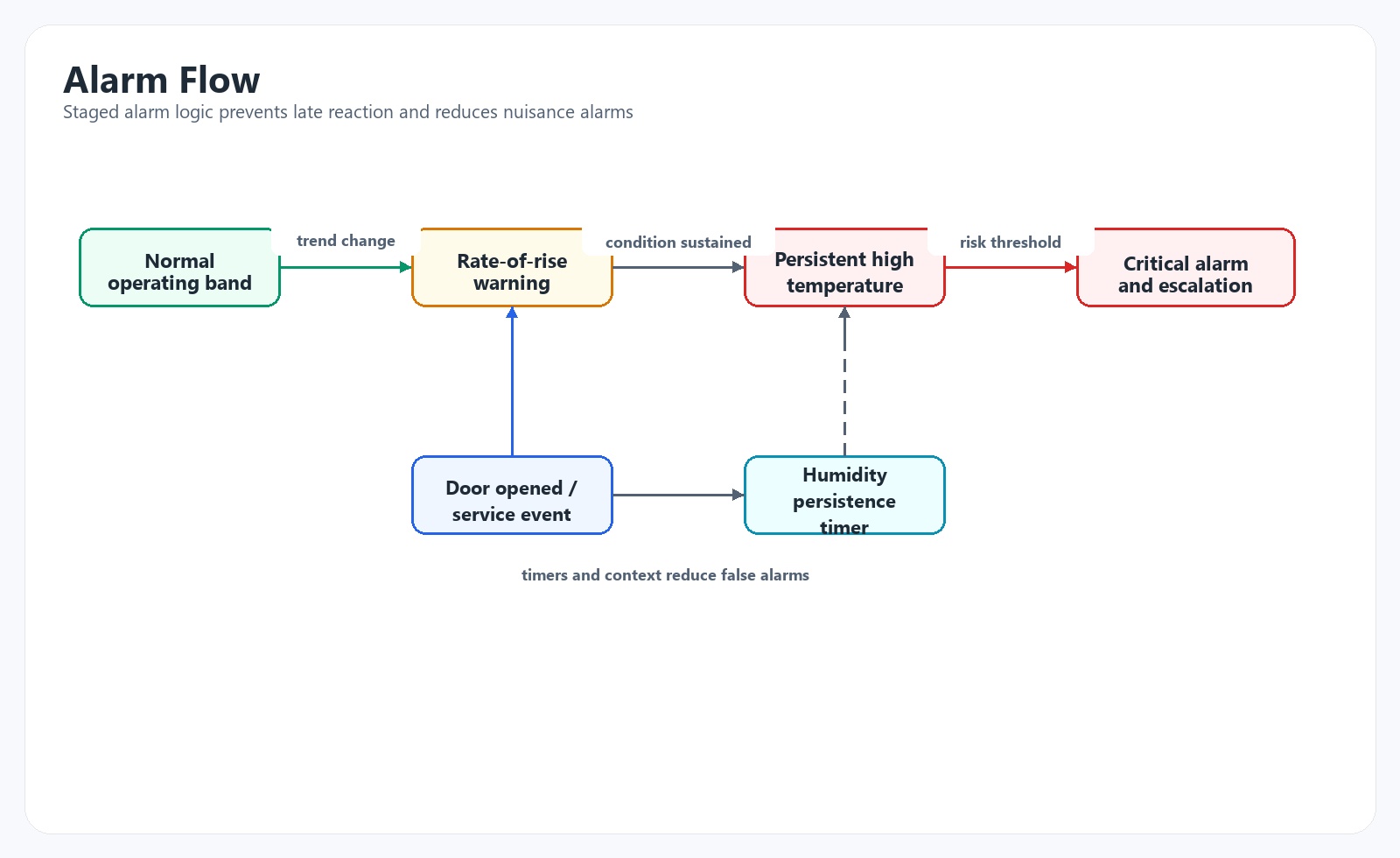
Alarm logic should include state, rate, and persistence. A cabinet at 38°C may be acceptable if stable under known load. The same cabinet rising from 32°C to 38°C in ten minutes may require action. A humidity warning after door opening may be informational for five minutes and critical if it persists. Good alarm logic reduces nuisance alarms while preserving early warnings.
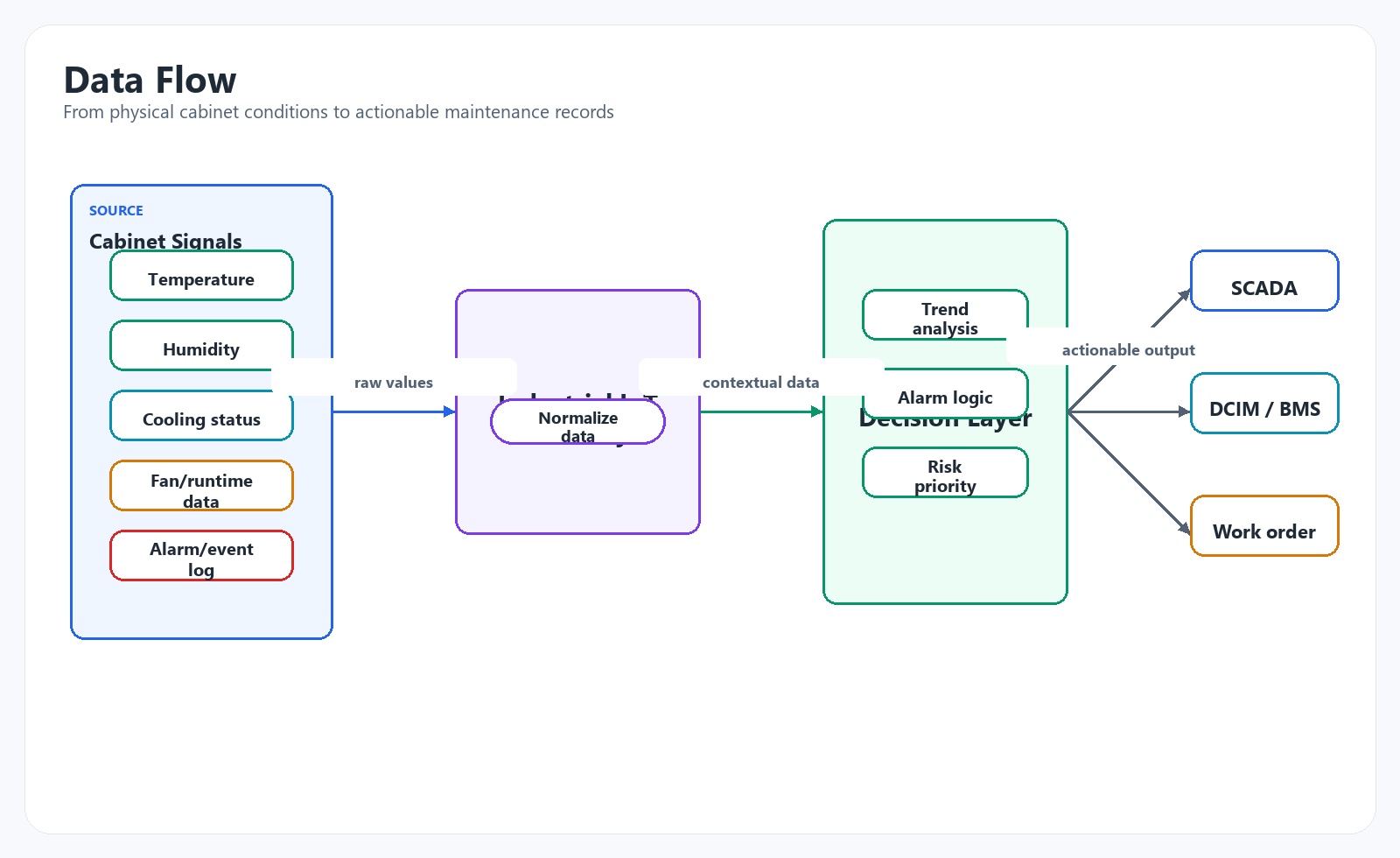
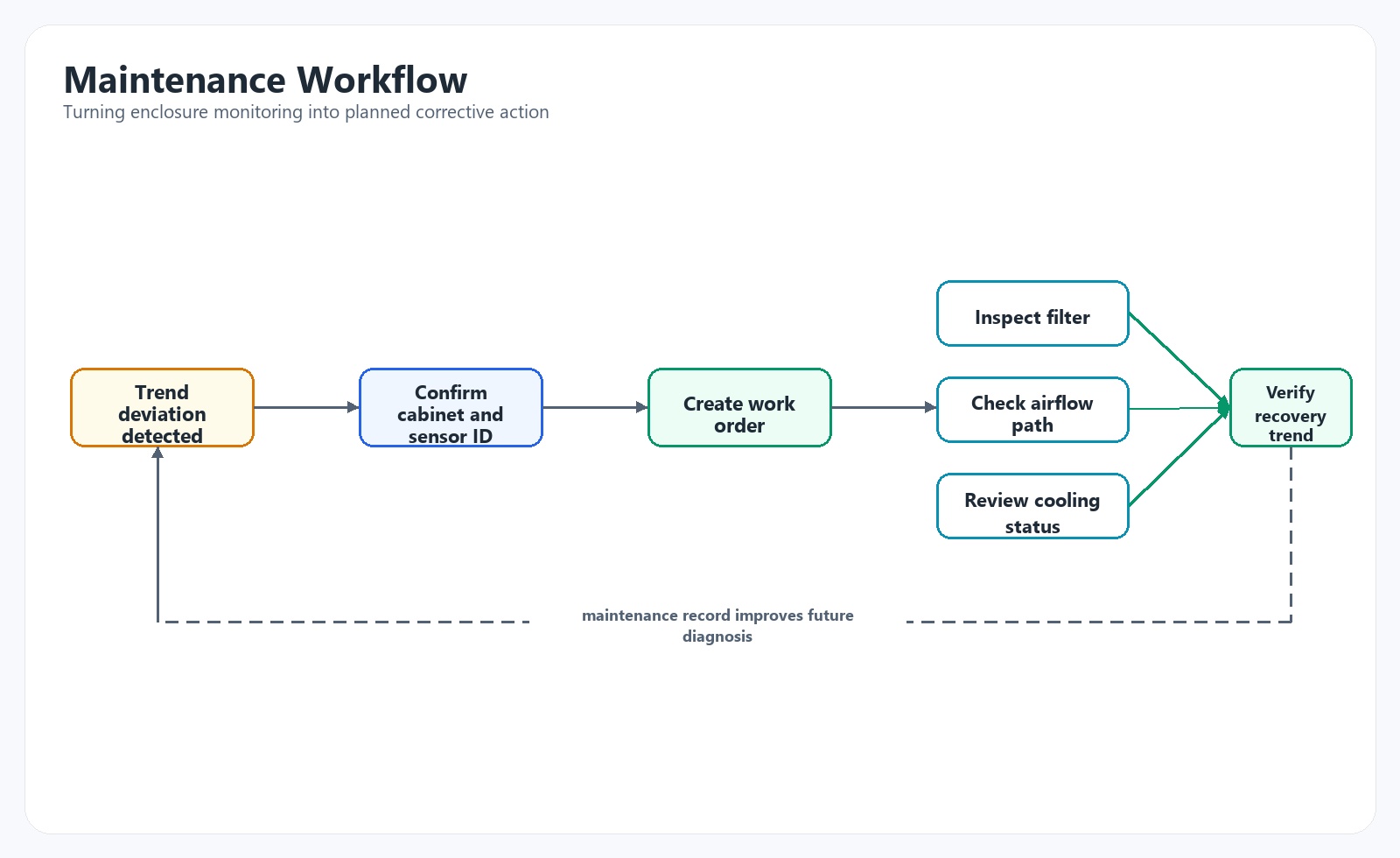
Maintenance workflow closes the loop. Monitoring without work orders becomes another dashboard. The system should help answer: Which cabinet? Which cooling unit? Which sensor? What changed? What is the likely cause? What spare part or cleaning action is needed? Who owns the response?
If I were designing a modern AI-capable data center or a high-availability edge facility, I would treat every important electrical enclosure as a managed thermal asset. That does not mean every cabinet needs the same instrumentation. It means the design starts by asking what failure of that enclosure would do to the facility.
For critical cabinets, I would specify the enclosure, cooling device, sensors, communication interface, alarm philosophy, and maintenance access as one system. The cabinet is not just sheet metal. It is a controlled environment for electronics. The cooling unit is not just an accessory. It is part of the reliability chain. The monitoring gateway is not just a convenience. It is the bridge between physical degradation and operational response.
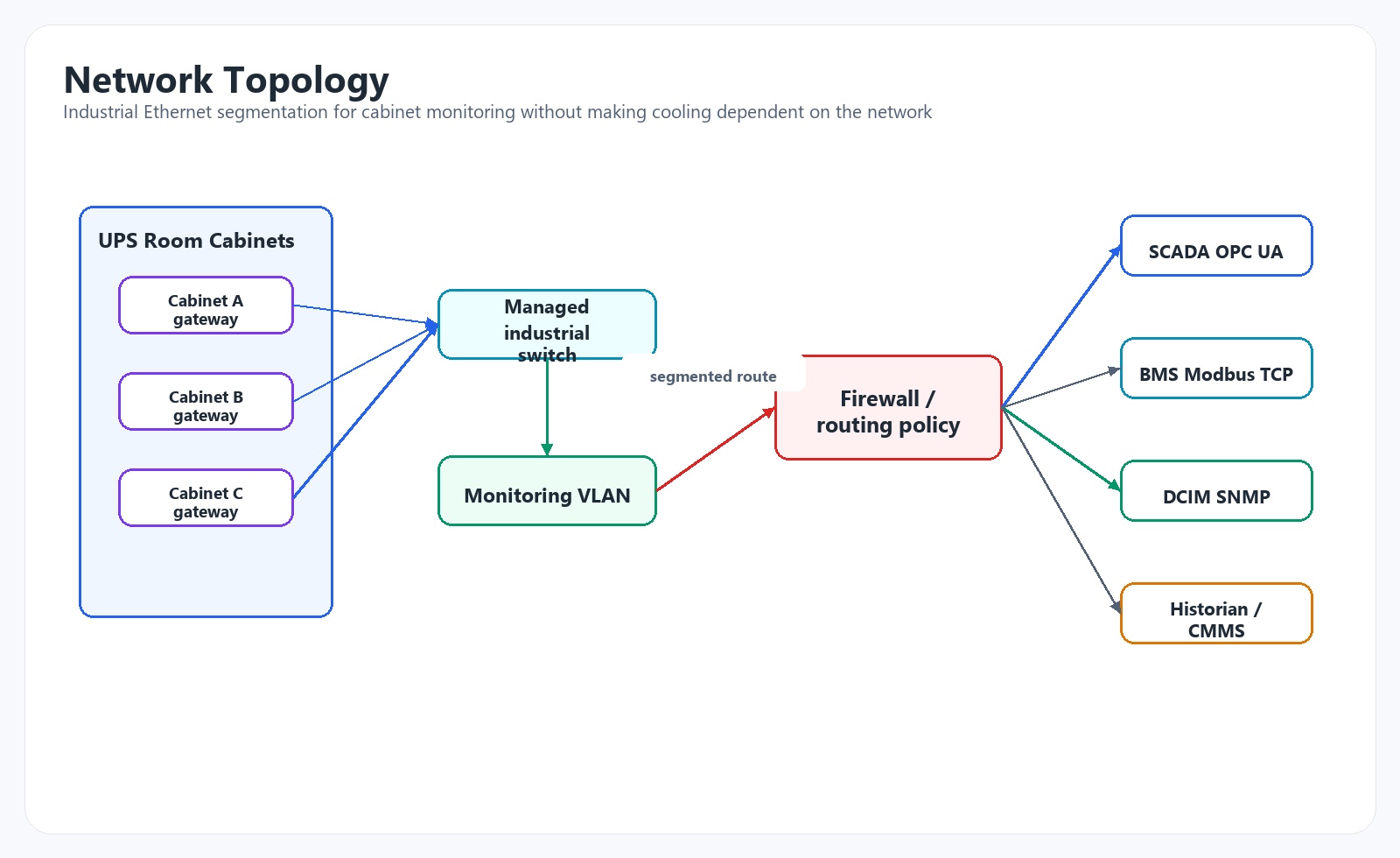
My preferred architecture separates local protection from supervisory intelligence. Local cooling control must continue even if the network is down. A cooling unit should not depend on SCADA polling to protect the cabinet. At the same time, the supervisory layer should collect enough data to detect abnormal trends before local protection trips. This separation prevents the common mistake of making a monitoring network part of the control loop where it does not belong.
Communication should be layered. Use industrial Ethernet for cabinet-level data transport. Use OPC UA where structured data, security, and integration with industrial systems matter. Use Modbus TCP where PLC or legacy SCADA integration is simple and sufficient. Use SNMP where IT operations or DCIM teams need status, traps, and standard network monitoring. One architecture can support all three, but each protocol should have a clear owner and purpose.
Maintenance must be designed into the physical layout. Sensors need accessible mounting. Filters need service clearance. The IoT interface or industrial IoT gateway should be reachable without exposing live power unnecessarily. Labels should match the DCIM, SCADA, and electrical drawings. Alarm names should tell a technician where to go, not only what point changed state.
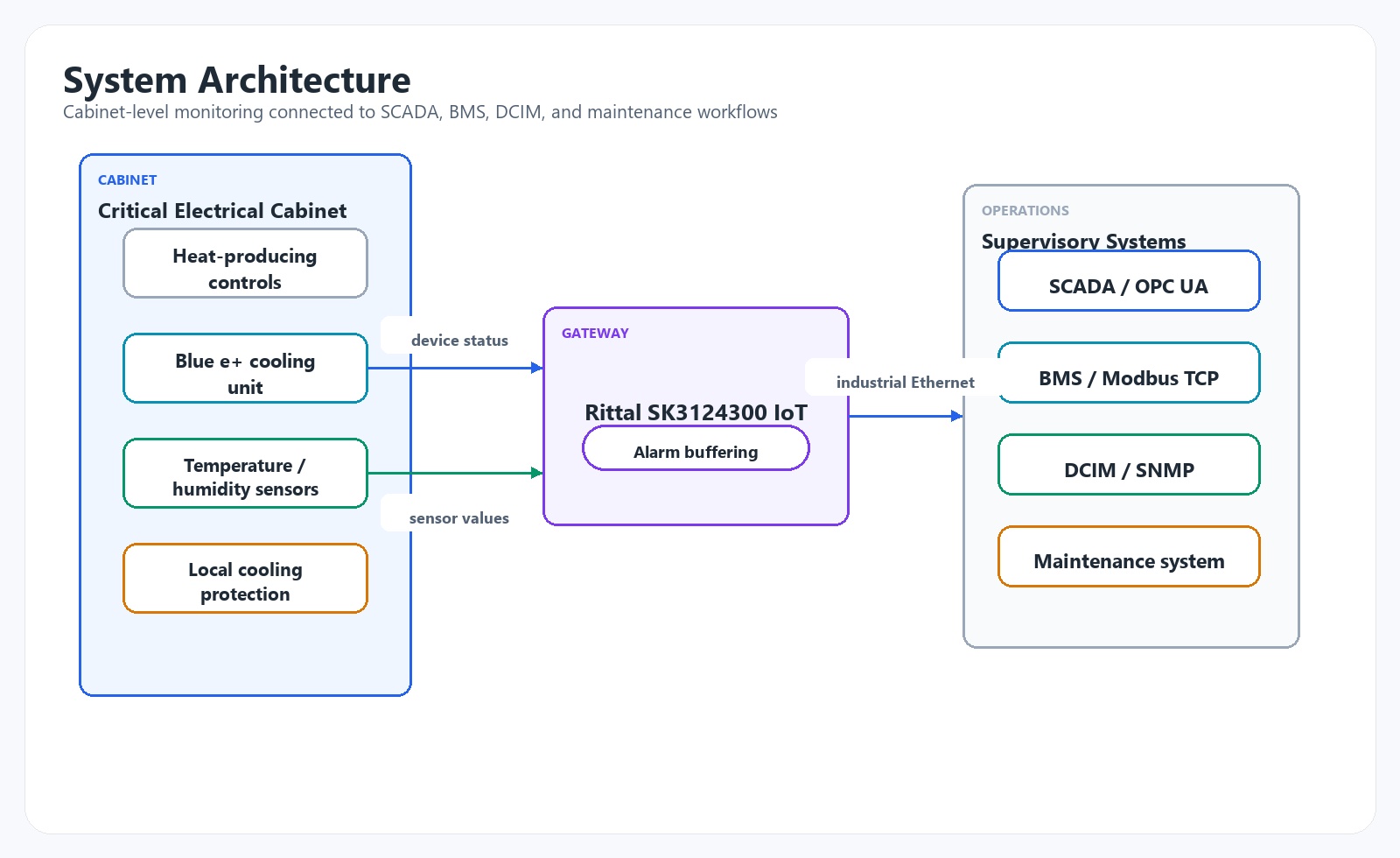
For critical enclosure climate monitoring, a practical architecture is to connect Rittal Blue e+ cooling units and environmental sensors to the Rittal SK3124300 IoT Interface then integrate the gateway into higher-level systems over industrial Ethernet using OPC UA, Modbus TCP, or SNMP.
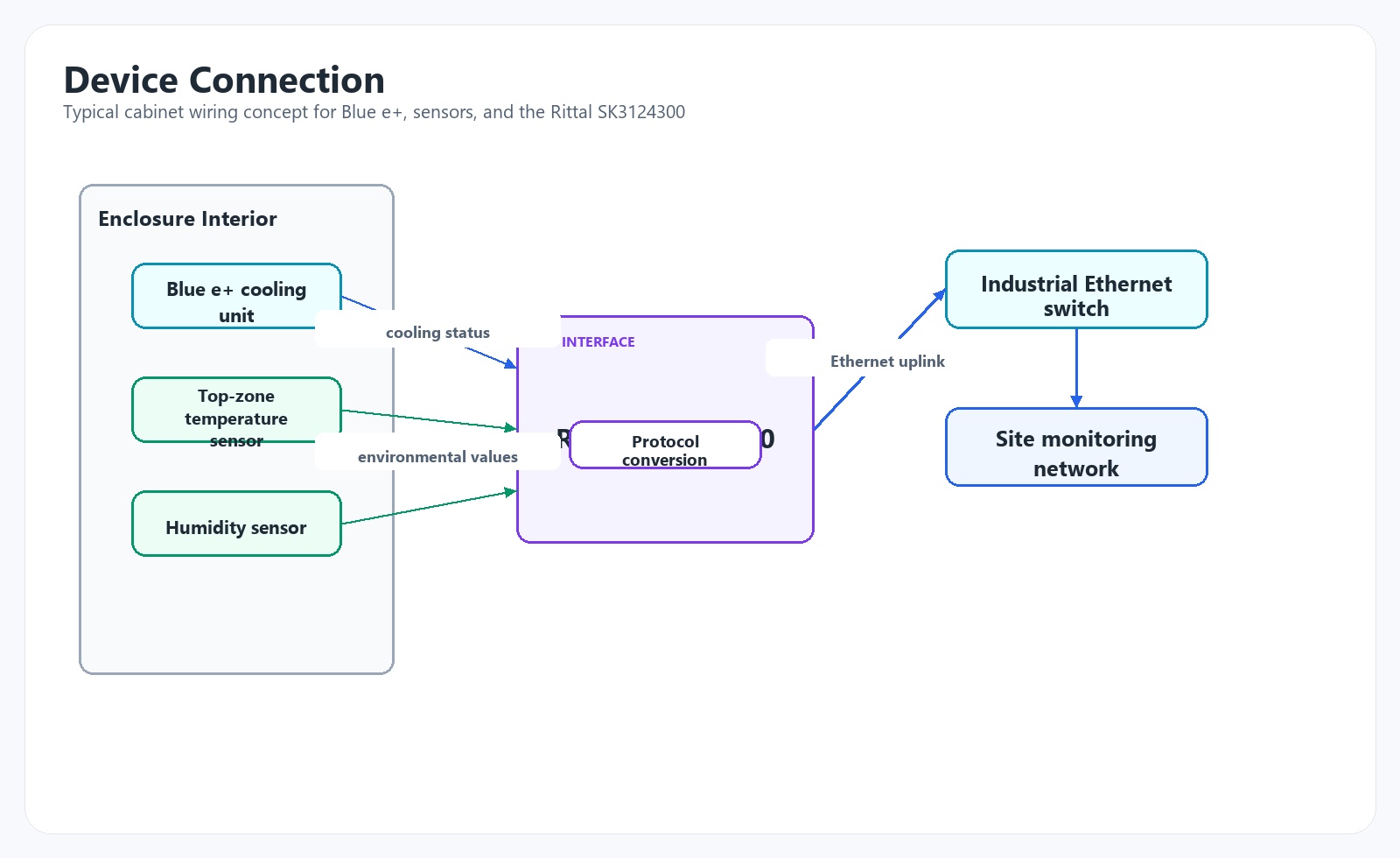
The reason for placing the Rittal SK3124300 at the cabinet layer is that enclosure climate data is most valuable close to the equipment. The gateway can collect cooling-unit status, sensor values, operating data, and alarms before the information is translated into a building or IT monitoring system. This avoids reducing the cabinet to one dry contact alarm.
Blue e+ cooling units are a good fit where cooling efficiency, variable operating behavior, and diagnostic data matter. In a data center, this is especially useful for UPS control cabinets, network rooms, battery monitoring panels, automation cabinets, and electrical distribution enclosures. The cooling unit handles local thermal control, while the IoT interface exposes the status and measurements to the systems that coordinate operations.
Temperature sensors should be installed in the likely hot zone, not just near the cooling unit. Humidity sensors should be added where condensation, door opening, ambient humidity, or battery-room conditions create risk. Industrial Ethernet provides the backbone. OPC UA can feed SCADA or industrial platforms with structured data. Modbus TCP can serve PLC or BMS integrations where a register-based model is expected. SNMP can send cabinet cooling monitoring data into DCIM or IT network monitoring platforms.
The advantage of this architecture is clarity. The cabinet remains locally protected. The monitoring layer collects richer data. The supervisory systems receive the protocol they can actually use. The maintenance team gets earlier and more specific warnings.
The trade-off is design effort. More data points require naming discipline, network security review, IP address management, alarm rationalization, and commissioning. A poorly configured IoT gateway can create noise. A well-designed one creates operational visibility.
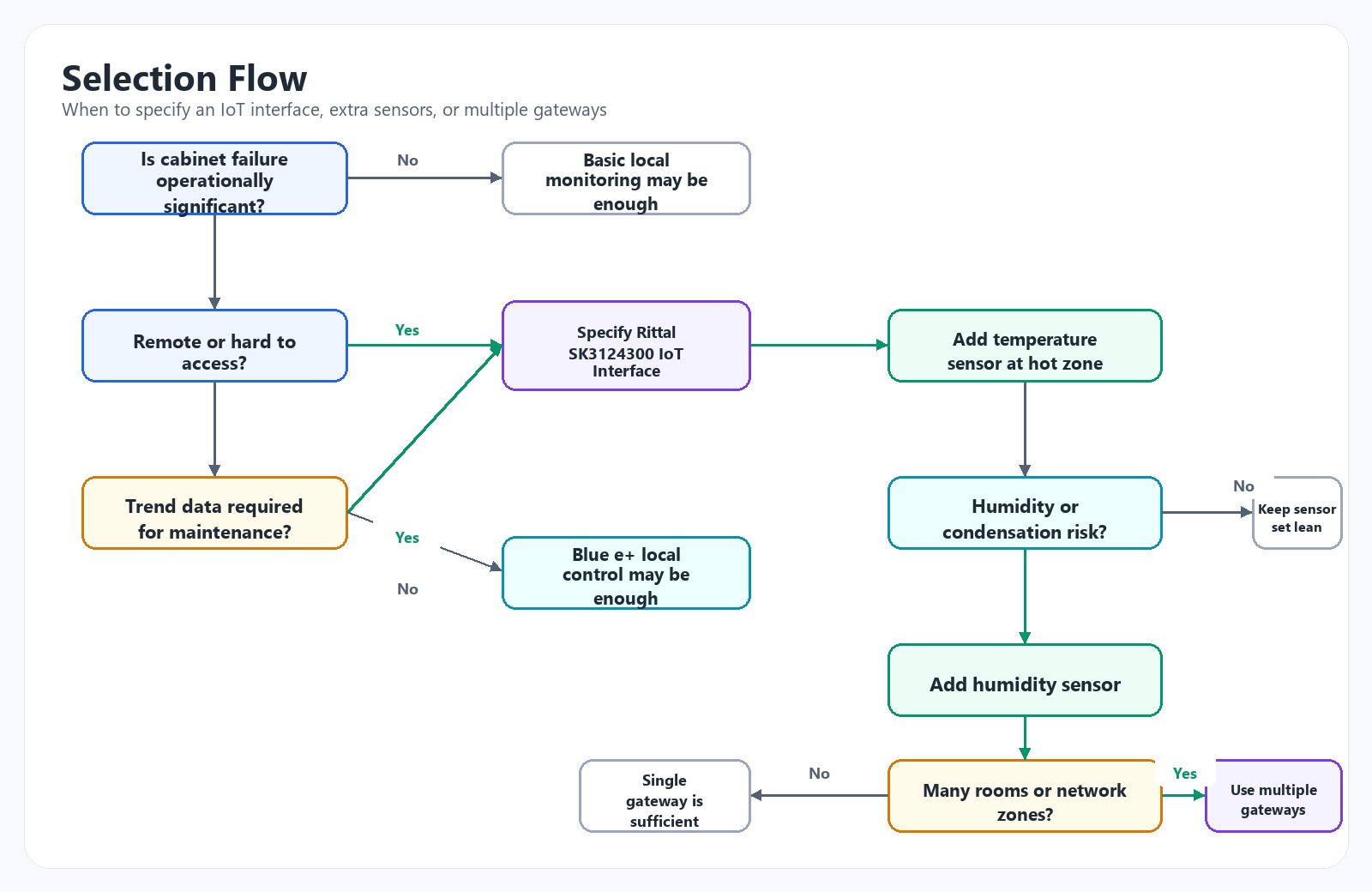
Use an IoT interface when the enclosure is critical, remote, thermally loaded, expensive to access, or historically troublesome. A UPS room cabinet supporting a Tier III data center should not rely only on a local display and a dry contact. A network room cooling panel that can disrupt multiple rows deserves continuous visibility. An edge data center with limited staffing benefits from remote diagnostics because the first truck roll should already know what to inspect.
You may not need an IoT interface for a small, non-critical enclosure with low heat load, stable ambient temperature, easy access, and simple maintenance responsibility. A junction box, small relay cabinet, or lightly loaded panel in a controlled room may only need a thermostat or periodic inspection.
Blue e+ alone may be enough when local thermal control is the main objective and the site team can inspect the cabinet regularly. It becomes insufficient when the organization needs trend data, centralized alarms, protocol integration, or predictive maintenance. The dividing line is not product capability; it is operational consequence.
Add more sensors when the cabinet is large, heat sources are separated, airflow is uncertain, humidity risk exists, or one sensor cannot represent the failure zone. For example, a tall UPS auxiliary cabinet may need a top-zone temperature sensor and a humidity sensor. A network cabinet with top-mounted switches and bottom cable entry may need sensing near the upper switch stack.
Use multiple IoT interfaces when cabinets are distributed across rooms, when network segmentation requires separation, when sensor and device counts exceed a practical grouping, or when one gateway would create an undesirable single point of monitoring failure. Do not connect every enclosure to one central gateway just to reduce hardware cost. Long cable runs, mixed ownership, and unclear fault location usually cost more later.
For procurement engineers, the buying decision should include more than item price. Check compatibility with the cooling units, firmware requirements, protocol needs, cybersecurity expectations, spare parts strategy, and commissioning labor. Also confirm who will own the IP address, alarm names, DCIM points, SCADA tags, and maintenance actions.
Consider a Tier III data center with 48 IT cabinets, two UPS rooms, one network room, and a separate electrical control area for chilled water and power monitoring. The facility has N+1 room cooling and good DCIM visibility for IT rack inlet temperature. The weakness is not the server hall. It is the support infrastructure.
During summer operation, one UPS room begins showing intermittent high-temperature alarms from a UPS auxiliary cabinet. The room temperature remains within limits, so the facility team initially treats the alarm as a sensor issue. A week later, the cabinet trips a 24 VDC power supply feeding monitoring relays. The UPS continues operating, but alarm visibility is degraded and the maintenance team must respond urgently.
The root cause is not dramatic. A cabinet cooling unit filter is partially blocked after construction work in an adjacent corridor. The cooling unit still runs, but airflow is reduced. The cabinet thermostat is mounted low, near the return path, while the affected power supply and Ethernet switch are mounted near the top. The local alarm only appears when the cabinet is already hot. The BMS receives a general fault, but no trend, no humidity data, no runtime behavior, and no clear diagnostic path.
The optimized design adds Blue e+ cooling monitoring through a Rittal SK3124300 IoT Interface, a top-zone temperature sensor, and a humidity sensor in each critical UPS auxiliary cabinet. The gateway connects to an industrial Ethernet switch in the UPS room. OPC UA feeds the SCADA system used by the electrical team. SNMP feeds the DCIM platform used by operations. Modbus TCP is available to the BMS for simplified alarm and temperature display.
Alarm logic is changed from a single high-temperature event to staged warnings. A rising temperature rate triggers an advisory. Sustained high temperature creates a maintenance ticket. Cooling-unit fault or communication loss creates a higher-priority alarm. Humidity above the site threshold after door opening creates a timed warning that clears only after conditions stabilize.
The maintenance workflow changes as well. When the trend shows longer cooling recovery and rising cabinet temperature during normal UPS load, the work order instructs the technician to inspect filter condition, airflow path, cooling unit status, and sensor readings. The fix is filter replacement and cleaning, completed during a planned maintenance window rather than after a cabinet fault.
Over the next five years, electrical cabinet design in AI data centers will move from static protection to condition-aware operation. The cabinet will still need correct thermal sizing, airflow design, grounding, segregation, and service access. Those fundamentals will not be replaced by software. What will change is the expectation that the cabinet can report its own operating condition with enough detail to support predictive maintenance and remote diagnostics.
Predictive maintenance will become practical where the monitored variables are physically meaningful. Temperature trend, fan runtime, compressor cycling, humidity, alarm frequency, door events, and cooling recovery time are useful because they connect directly to failure mechanisms. A machine-learning model built on poor sensor placement and vague alarms will not produce reliable maintenance decisions. Industrial AI needs clean engineering signals before it needs clever analytics.
Digital twin models will also become more grounded. Many digital twins are still asset databases with graphics. For enclosure climate, the useful twin is simpler and more operational: cabinet identity, heat load estimate, cooling capacity, sensor location, network path, alarm logic, maintenance history, and live condition. When this data is accurate, the facility team can compare expected thermal behavior against actual behavior. That is where early fault detection becomes credible.
Remote diagnostics will reshape procurement. Engineers will ask less often, “Does this cooling unit cool the cabinet?” and more often, “Can this cabinet explain what is happening before a technician arrives?” That question changes the value of an industrial IoT gateway. The gateway is not valuable because it is connected to Ethernet. It is valuable because it converts cabinet-level physics into information that SCADA, BMS, DCIM, and maintenance teams can act on.
There is also a design caution. More connectivity increases the need for cybersecurity discipline. OPC UA, Modbus TCP, SNMP, HTTPS, SSH, user accounts, VLANs, firewall rules, and firmware management must be treated as part of engineering scope. A data center enclosure monitoring project should involve controls, IT, facility operations, and cybersecurity early enough to avoid late-stage rework.
My view is that the strongest future architectures will be hybrid: local control remains deterministic and independent, while monitoring becomes richer, more networked, and more analytical. Blue e+ or similar intelligent cooling devices handle cabinet climate locally. Rittal SK3124300 or a comparable industrial IoT gateway exposes the right data. SCADA, BMS, and DCIM each consume the subset they need. Maintenance teams receive fewer alarms, but better ones.
For AI data centers, this is not about adding gadgets to cabinets. It is about acknowledging that the electrical and automation infrastructure has become part of the compute reliability chain. A GPU cluster can only run as reliably as the power, cooling, controls, and network cabinets that support it. The next generation of control cabinet monitoring will be judged by whether it helps engineers prevent boring, predictable failures before they become expensive incidents.